Networking
Network Policies with Cilium
We use Cilium to enforce NetworkPolicies on Constellation workloads.
Warning
Every workload deployed in an app-* namespace (e.g., specified under applications/{external,internal}) is blocked by default (except for CoreDNS & KubeAPI requests). This is enforced by labeling the namespace with deny-default-all: "true" in the App ApplicationSet (namespace labels are inherited by all workloads within the namespace).
This means your workload will not be able to connect to anything unless you explicitly allow it.
Available NetworkPolicies
Cilium matches NetworkPolicies to Identities (Kubernetes Labels). All you have to do is label your app appropriately, and it should be able to connect to external or internal workloads.
The following network policies are available:
deny-default-all: Blocks all traffic except CoreDNS & KubeAPI. Enabled by default, enforced at the namespace level.allow-egress-rds: Allow your app to connect to RDS.allow-ingress-traefik: Allow Traefik to route incoming requests to your app.allow-ingress-prometheus: Allow Prometheus to scrape your app.allow-egress-world: Allow outgoing connections to any endpoints outside the cluster.
Usage
Simply add the desired label for the correct network policy to your app's kustomization.yaml:
# applications/{external,internal}/<app>/overlays/<env>/kustomization.yaml
labels:
  - pairs:
      app: comply
      # Network Policies
      allow-ingress-traefik: "true"
      allow-egress-rds: "true"
    includeSelectors: true
Allow Pod-to-Pod Communication (e.g., Frontend to Backend)
To allow your frontend to communicate with your backend, you must allow your frontend to egress to your backend and your backend to ingress from your frontend pod. You need distinct label sets to uniquely identify your backend and frontend pods.
Tip
Even if your frontend app uses the service FQDN of your backend (e.g., backend-service.app-namespace.svc.cluster.local), you will need to explicitly allow your frontend Pod to communicate with your backend Pod.
Example Network Policy:
apiVersion: cilium.io/v2
kind: CiliumNetworkPolicy
metadata:
  name: allow-ingress-backend-from-frontend
  namespace: app-comply
spec:
  endpointSelector:
    matchLabels:
      k8s:component: comply-backend
      k8s:io.kubernetes.pod.namespace: app-comply
  ingress:
    - fromEndpoints:
        - matchLabels:
            k8s:component: comply-frontend
            k8s:io.kubernetes.pod.namespace: app-comply
      toPorts:
        - ports:
            - port: "8080" # Pod/Container Port
              protocol: TCP
---
apiVersion: cilium.io/v2
kind: CiliumNetworkPolicy
metadata:
  name: allow-egress-frontend-to-backend
  namespace: app-comply
spec:
  endpointSelector:
    matchLabels:
      k8s:component: comply-frontend
      k8s:io.kubernetes.pod.namespace: app-comply
  egress:
    - toEndpoints:
        - matchLabels:
            k8s:component: comply-backend
            k8s:io.kubernetes.pod.namespace: app-comply
      toPorts:
        - ports:
            - port: "8080" # Pod/Container Port
              protocol: TCP
Allow External Endpoints
Here is an example allowing outgoing traffic to external endpoints using the toFQDNS keyword:
apiVersion: cilium.io/v2
kind: CiliumNetworkPolicy
metadata:
  name: allow-egress-endpoints
spec:
  endpointSelector:
    matchLabels:
      k8s:component: passport-backend
      k8s:io.kubernetes.pod.namespace: app-passport
  egress:
    - toFQDNs:
        - matchName: slack.com
          rules:
            dns:
              - matchName: slack.com
        - matchName: api.bamboohr.com
          rules:
            dns:
              - matchName: api.bamboohr.com
        - matchName: clearroute.jamfcloud.com
          rules:
            dns:
              - matchName: clearroute.jamfcloud.com
        - matchName: vogsy.io
          rules:
            dns:
              - matchName: vogsy.io
Enable Passport
We purposely choose a mutual trust workflow. To allow apps to use Passport, you must allow Passport communication on your app side (egress) as well as on the Passport side (ingress).
Here is an example for Comply:
Application Side
apiVersion: cilium.io/v2
kind: CiliumNetworkPolicy
metadata:
  name: allow-egress-passport
spec:
  endpointSelector:
    matchLabels:
      k8s:component: comply-backend
      k8s:io.kubernetes.pod.namespace: app-comply
  egress:
    - toEndpoints:
        - matchLabels:
            k8s:component: passport-backend
            k8s:io.kubernetes.pod.namespace: app-passport
      toPorts:
        - ports:
            - port: "3001"
              protocol: TCP
Passport Side
apiVersion: cilium.io/v2
kind: CiliumNetworkPolicy
metadata:
  name: allow-comply
spec:
  endpointSelector:
    matchLabels:
      k8s:component: passport-backend
      k8s:io.kubernetes.pod.namespace: app-passport
  ingress:
    - fromEndpoints:
        - matchLabels:
            k8s:component: comply-backend
            k8s:io.kubernetes.pod.namespace: app-comply
      toPorts:
        - ports:
            - port: "3001"
              protocol: TCP
Hubble
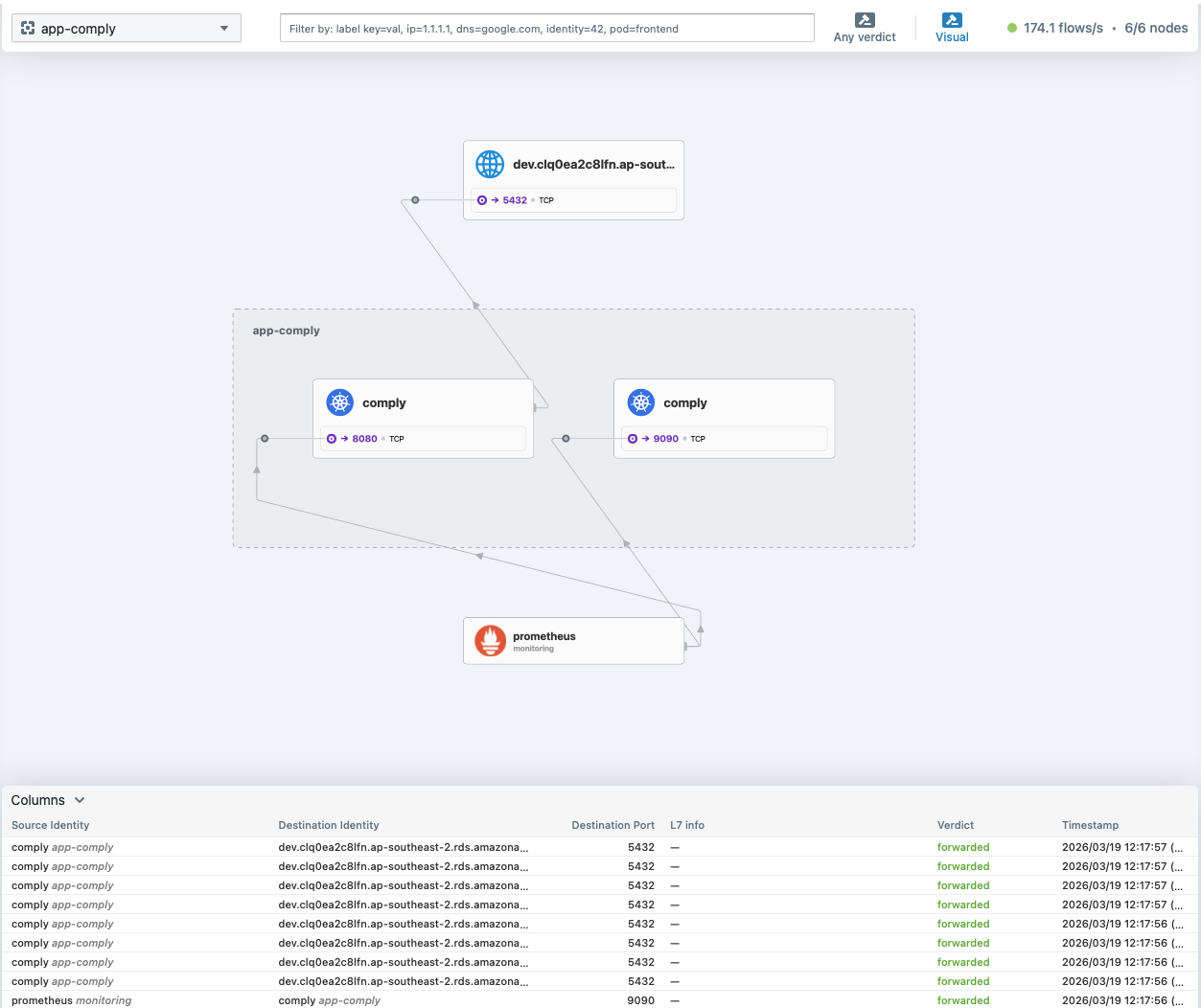
Hubble is Cilium's observability UI (the Hubble UI), which visualises the network flows of any given namespace. It is available under hubble.dev.clearroute.io (DEV) or hubble.clearroute.io (PROD). It also shows all network flows and whether they have been denied/dropped which is useful for debugging:
DNS with Route53
Simply add the external-dns.alpha.kubernetes.io/hostname annotation to your Ingress for an external resolvable Route53 record:
Info
external-dns only watches networking.k8s.io/v1 Ingress resources, so do not use Traefik's IngressRule CR.
apiVersion: networking.k8s.io/v1
kind: Ingress
metadata:
  name: engineering
  annotations:
    # Creates a Route53 record of engineering.sandbox.clearroute.io pointing to Constellation's NLB Public IP
    external-dns.alpha.kubernetes.io/hostname: engineering.sandbox.clearroute.io
spec: ...
Traefik
How to Expose My App Externally?
Warning
Be extra careful when exposing your App, as it will be available on the internet.
- Expose the port where your container/pod is serving its UI:
apiVersion: apps/v1
kind: Deployment
metadata:
  name: app
  labels:
    app: <app-name>
spec:
  replicas: 1
  template:
    spec:
      containers:
      - name: app
        image: clearroute/app
        ports:
            - containerPort: <Port> # change to your applications port
            ...
apiVersion: v1
kind: Service
metadata:
  name: app
spec:
  type: ClusterIP
  selector:
    app: <app-name>
  ports:
  - port: 80
    protocol: TCP
    targetPort: <container port>
- Add an
Ingress:
apiVersion: networking.k8s.io/v1
kind: Ingress
metadata:
  name: app
  annotations:
    cert-manager.io/cluster-issuer: letsencrypt
    cert-manager.io/acme-challenge-type: dns01
    traefik.ingress.kubernetes.io/router.entrypoints: websecure
    traefik.ingress.kubernetes.io/router.tls: "true"
    traefik.ingress.kubernetes.io/router.middlewares: traefik-redirect-https@kubernetescrd # HTTP to HTTPS redirect
spec:
  ingressClassName: traefik
  rules:
  - host: app.dev.clearroute.io # Your hostname
    http:
      paths:
      - backend:
          service:
            name: app # Your service name
            port:
              number: 80 # Your service port
        path: /
        pathType: Prefix
  tls:
  - hosts:
    - engineering.dev.clearroute.io # Your hostname
    secretName: engineering-cert