Monitoring & Alerting
Automatic Blackbox Monitoring
Tip
All ingresses are automatically scraped by the Blackbox Prober. These metrics are visualized in the Blackbox Prober Dashboard. This is achieved by leveraging kubernetes_sd_config.
Prometheus
Collecting Prometheus Metrics
If your application exposes Prometheus metrics, you can use a ServiceMonitor to collect them:
apiVersion: v1
kind: Service
metadata:
  name: atlas
  labels:
    app: atlas
spec:
  ports:
  - port: 80
    name: http
    protocol: TCP
    targetPort: 3001
  - port: 9090
    name: metrics
    protocol: TCP
    targetPort: 9090
  selector:
    app: atlas
---
apiVersion: monitoring.coreos.com/v1
kind: ServiceMonitor
metadata:
  name: atlas
  namespace: monitoring
  labels:
    release: kube-prometheus-stack # Important: Required for Prometheus to pick up the monitor
spec:
  selector:
    matchLabels:
      app: atlas # Must match the Service labels
  endpoints:
    - port: metrics # Must match the name of the metrics port in the Service
      interval: 30s
      scheme: http
Alerting
How to Add an Alert
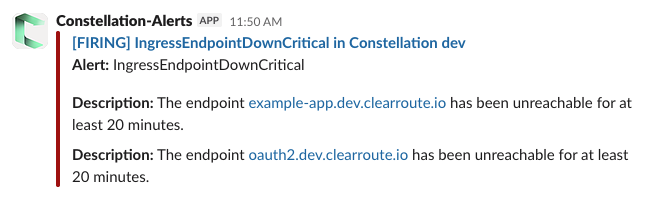
Below is an example PrometheusRule manifest. When triggered, it sends an alert to the #constellation-notifications Slack channel:
apiVersion: monitoring.coreos.com/v1
kind: PrometheusRule
metadata:
  name: ingress-blackbox-probe-success
  labels:
    release: kube-prometheus-stack
spec:
  groups:
    - name: IngressBlackboxProbes
      rules:
        - alert: IngressEndpointDown
          expr: max_over_time(probe_success{job="scrapeConfig/blackbox-exporter/ingresses"}[5m]) == 0
          for: 2m
          labels:
            severity: warning
            team: platform
            namespace: monitoring
          annotations:
            summary: Ingress Endpoint down
            description: The endpoint {{ $labels.instance }} has been unreachable for at least 5 minutes.
        - alert: IngressEndpointDownCritical
          expr: max_over_time(probe_success{job="scrapeConfig/blackbox-exporter/ingresses"}[15m]) == 0
          for: 5m
          labels:
            severity: critical
            team: platform
            namespace: monitoring
          annotations:
            summary: "Endpoint down for 20+ minutes"
            description: The endpoint {{ $labels.instance }} has been unreachable for at least 20 minutes.
Grafana
How to Add a Custom Grafana Dashboard
To add a custom dashboard:
- Place your dashboard JSON file in
argocd/kube-prometheus-stack/dashboards/. - Update
argocd/kube-prometheus-stack/kustomization.yamlto include your file in theconfigMapGenerator.
Tip
- The
grafana_dashboardlabel is required! - The
grafana_folderannotation specifies the Grafana folder for the dashboard.
apiVersion: kustomize.config.k8s.io/v1beta1
kind: Kustomization

configMapGenerator:
  - name: dashboard
    files:
      - ./files/dashboard.json
    options:
      disableNameSuffixHash: true
      labels:
        # https://docs.syseleven.de/metakube-accelerator/building-blocks/observability-monitoring/kube-prometheus-stack#adding-grafana-dashboards
        grafana_dashboard: "1"
      annotations:
        # has been specified in sidecar.dashboards.folderAnnotation in helm-values/kube-prometheus-stack-values.yaml
        grafana_folder: ClearRoute